안녕하세요 여러분! 평범한 컴과생입니다.
salesforce를 하면서
알림창, modal창을 사용하는 경우가 많잖아요.
사실 저조차도 헷갈려서;;
정리를 한번 해보고자 합니다..
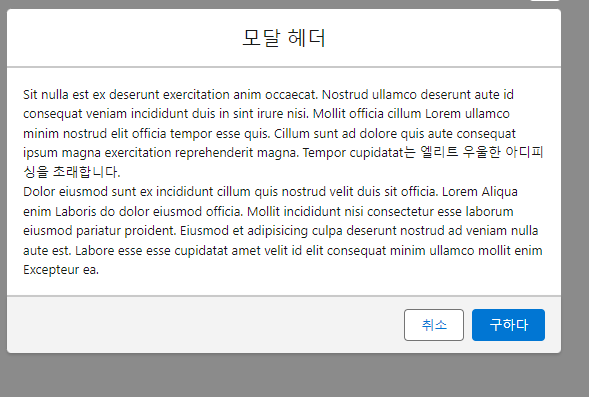
오늘은 첫번째로 modal을 다뤄보려고 하는데요.
Lightning Component에서 modal은 어떻게 사용할까요?
크게 2가지의 설정이 필요합니다.
첫번째는, cmp의 디자인을 설정하는 부분이고요.
두번째는, modal이 언제 렌더링될지 지정하는 것입니다.
<aura:component>
    <aura:attribute name="isModalOpen" type="Boolean" default="false" />

    <lightning:button label="Open Modal" onclick="{!c.openModal}" />

    <aura:if isTrue="{!v.isModalOpen}">
        <section role="dialog" tabindex="-1" class="slds-modal slds-fade-in-open">
            <div class="slds-modal__container">
                <!-- Header 부분 -->
                <header class="slds-modal__header">
                    <lightning:buttonIcon iconName="utility:close" alternativeText="close" class="slds-modal__close" onclick="{!c.closeModal}" />
                    <h2 class="slds-text-heading_medium">Modal Header</h2>
                </header>

                <!-- Body 부분 -->
                <div class="slds-modal__content slds-p-around_medium">
                    <p>This is the modal body content.</p>
                </div>

                <!-- Footer 부분 -->
                <footer class="slds-modal__footer">
                    <lightning:button variant="neutral" label="Cancel" onclick="{!c.closeModal}" />
                    <lightning:button variant="brand" label="Save" onclick="{!c.save}" />
                </footer>
            </div>
        </section>
        <div class="slds-backdrop slds-backdrop_open"></div> <!-- Backdrop -->
    </aura:if>
</aura:component>
지금부터 하나하나 살펴보자면..
<aura:attribute name="isModalOpen" type="Boolean" default="false" />
이 부분은 모달의 가시성을 제어하는 속성을 하나 만든 것입니다.
코드의 맨 윗부분에 먼저 선언을 해둬야 사용하기 편리하겠죠?
modal이 오픈될지 말지에 대해서 정해주면 되어서
type은 Boolean으로 지정됩니다.
<aura:if isTrue="{!v.isModalOpen}">
다음 부분은 if 조건문입니다.
그러니까 위에서 설정해둔 변수 isModalOpen이 true로 되어 있다면
모달과 배경이 렌더링됩니다. 해당 값이 true이면
그 아래에 있는 modal이 등장하는 형식입니다.
<lightning:button variant="neutral" label="Cancel" onclick="{!c.closeModal}" />
<lightning:button variant="brand" label="Save" onclick="{!c.save}" />
그 다음은 footer 부분인데요.
footer에는 보통 '취소/닫기'나 '저장' 버튼이 옵니다.
각 버튼이 클릭될 때 controller에서 지정된 기능이 실행됩니다.
({
    openModal : function(component, event, helper) {
        // Set the attribute to true to show the modal
        component.set("v.isModalOpen", true);
    },

    closeModal : function(component, event, helper) {
        // Set the attribute to false to hide the modal
        component.set("v.isModalOpen", false);
    },

    save : function(component, event, helper) {
        // Perform save action, then close the modal
        alert("Save button clicked!");
        component.set("v.isModalOpen", false);
    }
})
다음은 controller인데요.
controller에서는 보통 button을 누르는 등...
어떠한 event가 일어날 때
그 상황을 구체화한다고 생각하시면 됩니다.
modal의 큰 틀은 이렇습니다.
다음에는 alert나 toast를 알려드릴게요.
참고 사이트)
https://developer.salesforce.com/docs/platform/lwc/guide/use-dialog-modal.html
'공부 기록 > Salesforce' 카테고리의 다른 글
| 2024 Seoul Dreamin 정리 (0) | 2024.10.25 |
|---|---|
| salesforce prompt (2) | 2024.10.10 |
| visualforce page 추가하는 법 (1) | 2024.10.08 |
| org 새로 만드는 방법 & 언어 바꾸는 방법 (1) | 2024.10.01 |
| components 구분에 대하여 (0) | 2024.09.30 |